One of the first things you do when checking connectivity issues on the Checkpoint (or any networking gear for that matter) is to see speed and duplex parameters of the interfaces. But have you tried to do it on a firewall with 15-20 interfaces ?
No fun entering one by one interfaces’ names. Here is the one-liner I use to get speed and duplex settings of all interfaces in one go.
# for ii in $(ifconfig | awk ' /Ethernet/ {print $1}') ;do ethtool $ii; done | egrep 'eth|Speed|Duplex'
Settings for eth0:
Speed: 100Mb/s
Duplex: Full
Settings for eth1:
Speed: 1000Mb/s
Duplex: Full
Settings for eth1.150:
Speed: 1000Mb/s
Duplex: Full
Settings for eth1.160:
Speed: 1000Mb/s
Duplex: Full
Settings for eth1.161:
Speed: 1000Mb/s
Duplex: Full
Settings for eth1.270:
Speed: 1000Mb/s
Duplex: Full
Settings for eth1.271:
Speed: 1000Mb/s
Duplex: Full
Continue reading
yurisk.info
Yuri Slobodyanyuk's blog on IT Security and Networking sharing experience and expertise
Page 4 of 24
It was predictable thing for Fortinet to do as everyone else has already been doing so.
I haven’t verified myself but according to the informed source (can only say his name – Hen) they are using
Maxmind database . So let’s see how to do it .
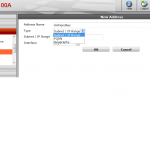
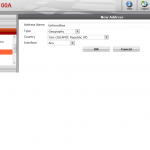
First you create in New Address dialog window the Geography type object specifying the country. As you can only pick one country per address use Address Groups to combine few countries together.
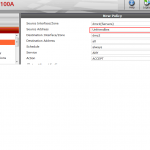
After creating such Address object you can use it in Firewall Policy just as you would the usual Address.
Personal Note: While there is an ongoing fuss/hysteria about the cyberwar being waged that started 2 weeks ago when Saudi “hackers” DDOS’ed few Israel websites, from what I see in the field it is more of a FUD campaign, one of the byproducts of which is rush of many website owners in Israel to block Saudi Arabia IPs (or any Arabic world IPs for that matter). What happened in fact was that most of DDOS came from anywhere but Arab world (Russia, China,US) , from botnets-for-hire.
The only reason I can think of why you would use Geo location block is to lower noise/size of logs by silently dropping traffic from unwanted countries.
Running diagnose sniffer packet on Fortinet Fortigate unit outputs human-readable packet information and packet data . Only that sometimes you would like to have the traffic sniffed at Fortigate in Wireshark-readable format so that it can be analyzed by all powerful Wireshark.
For this case Fortinet came up with the script and application that takes text output of this sniffer command and parses it into tcpdump format (.cap) which you can later open in Wireshark.
I guess there are other scripts available that do just that (after all it is just parsing the text file) , but from Fortinet you can find it here:
kb.fortinet.com/kb/viewContent.do?externalId=11186&sliceId=1
Or by searching their website for
fgt2eth.pl
fgt2eth.zip
As I mentioned before once you export firewall logs into human-readable format you can do lots of interesting things – for example script that gives statistics of how many times each Security rule was hit .
Be aware that this counts explicit Security rules only – i.e. the ones you see in Security tab of the Smartdashboard. No other rules you usually see in Smartview Tracker are counted – e.g. SmartDefense,Web Filtering etc. Also afterwards I sort it by number of hits to see what rules are used most:
Rule number:  Hits: 1197330  Ignore this line as it counts non-matched lines I dont want to filter with additional conditions and added time processing
 Rule number: 2 Hits: 9
 Rule number: 5 Hits: 366
 Rule number: 11 Hits: 12296
 Rule number: 9 Hits: 14457
 Rule number: 0 Hits: 17094
 Rule number: 1 Hits: 44066
 Rule number: 7 Hits: 233643
 Rule number: 10 Hits: 366275
 Rule number: 6 Hits: 424639
Rule number: D199972C-ED3E-4EB4-8B83-813333156D18 Hits: 175
 Rule number: 85A905A7-951E-4100-A4BA-E13333151D29 Hits: 219
 Rule number: 81333316-E942-4313-BB7D-E1333315802F Hits: 1519
 Rule number: 71333215-2DB5-4A3A-95BC-5080AD0F5564 Hits: 2298
 Rule number: 11331315-AE52-44E0-A42A-711029B5768E Hits: 3755
 Rule number: 01333315-D290-4B05-AFE7-23BF24D889FF Hits: 4116
 Rule number: 121FA62F-3885-4328-8090-BF1333315eB1 Hits: 399793
 Rule number: FE40E076-BAEB-4979-8E41-5EF1333315e6 Hits: 440101
 Rule number: BB3F6772-4D38-4D5A-952A-301333315de8 Hits: 1354341
Running time for a file of 900 Mb with 4.7 million records
real    5m50.287s
user    4m22.890s
sys     0m3.190s
It is hard to argue that logs are as good as correct they are. And correct timestamps of the logs are crucial to this. Internal clock is prone to drifting with time, in my experience I’ve seen some UTM appliances to drift as much as 40 minutes in just one year ! Even worse is that you can never be sure of the drift distribution over time – it may be incremental drift every day, or sudden jump due to who knows what.
To prevent this from happening I use NTP time synchronization on all of my servers/firewalls. If you have been in system administration for some time it is old news for you – just use ntpd daemon and pool.ntp.org servers located close to you, and you are set in 5 minutes.
In Checkpoint they took the hardening of the underlying OS to extreme and supplied only outdated ntpdate utility for the task, no ntpd for us.
Not a big deal – I use the cron job below to run every 30 minutes ntpdate to update the firewall clock and so better be you.
Cheers
30 * * * * /usr/sbin/ntpdate 1.uk.pool.ntp.org > dev/null