Checkpoint winscp troubles
Checkpoint firewalls have 3 means of transferring files in/out - ftp (client ) , SCP (server and client) and SFTP (haven't tried it yet) . At some stage of the debug/upgrade process you will have to move files in either direction. The most secure is SCP protocol. On windows platforms picking the GUI SCP client is not hard - you only have WinSCP as your choice. And being otherwise reliable and easy to use software it just doesn't work with Checkpoint sometimes. Here is how make sure it works.
But first few prerequisites:
To allow SCP connection to the firewall you have to :
- create file named /etc/scpusers
- add to it user per line - with which user you will be connecting
- make sure that for this user(s) shell is set to /bin/bash in /etc/passwd file
- and of course allow SSH protocol connection from your host to the firewall.
After all the above done you connect using WinSCP, all goes well, try to download some file and ...
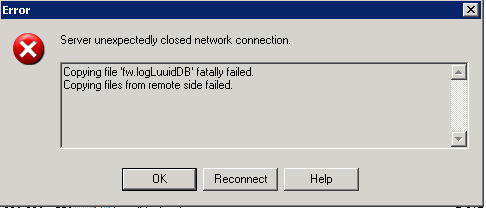
Error happens...
The easiest way is to .. NOT use WinSCP but instead use wonderful software PSCP from Putty author that doesn't have GUI but works flawlessly with Checkpoint always (Ok, the issue is with some versions of WinSCP only, so you CAN use it but have to find the appropriate version).
Download it here www.chiark.greenend.org.uk/~sgtatham , read instructions and have no regrets ever after.
Follow me on https://www.linkedin.com/in/yurislobodyanyuk/ not to miss what I publish on Linkedin, Github, blog, and more.